
Notes Wall
The Notes Wall holds the measurements, schedules, instructions and links that never quite fit a checklist. Notes are color-coded, can be pinned to the top, and are shared with everyone in the house.
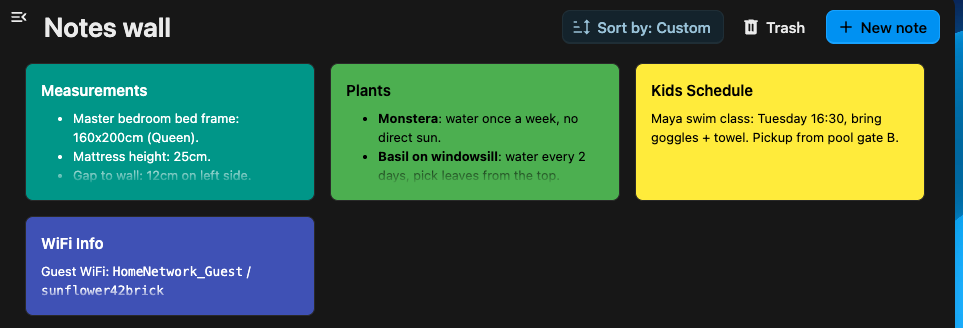
Create a note
Section titled “Create a note”-
Open the Notes Wall.
-
Select New note.
-
Give it a title and content — Markdown, so headings, lists, links and task lists all work.
-
Open the Notes Wall tab.
-
Tap the add button.
-
Give it a title and content — Markdown, so headings, lists, links and task lists all work.
Task lists
Section titled “Task lists”A note written with Markdown task lines (- [ ] Rinse the filter) renders them as checkboxes you
can tick straight from the note — no need to open the editor. A tick is saved back into the note’s
text, so everyone in the house sees it.
Color and pin
Section titled “Color and pin”- Color a note (or leave it the default) to tell notes apart at a glance — the same palette the app uses.
- Pin a note to keep it at the top of the wall, above the rest.
- Reorder notes to arrange the wall the way the house thinks about them.
Turn a note into a list
Section titled “Turn a note into a list”A note that has grown into a shopping or to-do list can be imported straight into a checklist with Import to list — pick the destination list and Pantry turns the note’s lines into items.
Sync a note with a file
Section titled “Sync a note with a file”A note can be tied to a Markdown file in your Nextcloud Files. Edit the note in Pantry and the file changes; edit the file — in the Files app, in Notes, on a synced desktop folder — and the note changes. Each edit is carried across as it is saved, so the two never sit out of step waiting for a sync to run.
This is how you keep a note where the rest of your writing lives, or bring writing you already have onto the wall.
Start from a note
Section titled “Start from a note”-
Open the note’s menu and select Sync to file ….
-
Pick the folder to keep the file in.
Pantry creates the file there, named after the note, and holds the two together from then on. The file is created in your own Files — housemates editing the note write through to it, wherever it lives.
Start from a file
Section titled “Start from a file”-
On the Notes Wall, select Import from file ….
-
Pick a Markdown or text file.
The file becomes a note on the wall, titled after the filename, and the two stay tied together.
The filename is the title
Section titled “The filename is the title”A synced note’s title and its filename are the same thing, which is what lets Notes show a synced note as one of its own. Rename the note and the file is renamed; rename the file and the note takes the new name.
Filenames cannot hold every character a title can, so a title like Trip: 2026/07 becomes the file
Trip_ 2026_07.md — and the note takes that spelling too, to keep the two in agreement.
Where it shows
Section titled “Where it shows”A synced note carries the path of its file at the bottom of the card, so you can tell at a glance which notes are tied to a file and which stand alone.
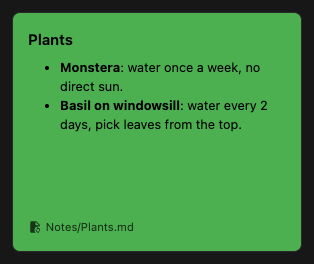
Moving the file in Files does not break anything — the note follows it, and the path on the card updates. If the file is in the trash, the card says its file is missing; restoring the file picks the sync back up.
Stop syncing
Section titled “Stop syncing”Select Stop syncing on the note. The note keeps its content, the file keeps its content, and neither one sees the other’s edits again.
Moving a note to the trash soft-deletes it. Trashed notes can be restored, or permanently deleted, from the trash view.